Looking for a Convert alternative?
Convert figures verified on convert.com/pricing, convert.com/features and docs.developers.convert.com on 6 September 2026. Check their site for current numbers.
Convert is a well built product from a company that behaves decently: public prices, no forced upgrades, overage you can switch off. Almost nobody leaves it in frustration. They leave over the bill at their volume, over the per project ceilings on the Growth plan, or because they would rather write a variation than draw one. This page is the whole argument in one place: what Convert charges, how the two products differ object by object, and what a move actually costs you in hours.
Skip ahead to the feature by feature comparison, or to what migrating involves.
Why teams start looking
Four things send people to this search, and only the first is the headline price.
The bill at your volume. Convert prices on Monthly Tested Users, with the slider stepping at 100,000, 250,000, 500,000, 750,000 and 1,000,000 and up. Growth is $399 a month billed monthly, or $3,588 for the year billed annually, which works out at $299 a month. Pro is $599 a month billed monthly, or $5,040 for the year billed annually, which works out at $420 a month. Enterprise is price on request, annual only. One thing to expect when you click through: their pricing page opens on the annual toggle, so $299 is the first number you see, not $399. Read both columns together before you quote either one: the two cycles differ by roughly 25 to 30 percent, so a bare "$299" is not a number anyone can budget against.
The per project ceilings, which bite before the price does. Growth allows 5 active projects, 5 active experiences per project, 30 goals per project, 5 custom segments per project and 10 active domains. Pro lifts experiences per project to unlimited and takes projects to 30, goals to 100 and segments to 10. Enterprise is unlimited projects with 200 goals and 20 segments each. The unit is what matters. A program that outgrows five concurrent experiences either splits itself across projects to buy headroom, which fragments the reporting, or moves up to Pro, which is another $200 a month billed monthly.
The visual editor sits at the centre of the product. That is a strength when a page owner builds variants without waiting for a developer. It also carries a consequence Convert documents plainly, and it is worth knowing before anyone plans code level work: "Visual Editor changes (DOM mutations defined in the UI) are not delivered to Fullstack-SDK callers." A variation drawn in the interface is not something a code level consumer can see or reuse.
Overage, where Convert is better than its category. Growth bills $399 per extra 100,000 tested users, Pro and Enterprise bill $699 per extra 250,000, and the whole mechanism can be switched off. Credit where it is due. That is a fairer default than most of this market ships.
What ABTestly is, in Convert's vocabulary
If you already think in Convert's objects, the map is short. Convert organises work as Project, Experience, Variation, Goal, Audience, Segment and Site Area. Here is what each one becomes.
| In Convert | In ABTestly |
|---|---|
| Project | Site. The hosts an experiment may serve on are declared on the site, and the snippet serves nothing on a host you have not declared |
| Experience | Experiment. A/B with multiple variants, and split URL. No multivariate, no full stack, no feature flags |
| Variation | Variation, written as JavaScript and CSS in the Monaco editor. Nothing is generated for you and nothing is hidden from you |
| Goal | Goal, drawn from a site scoped library: click, page visit, form submit, scroll depth, engaged session, custom event and revenue. Two system goals attach to every new experiment automatically |
| Audience | Audience conditions: device, browser, operating system, language, all five UTM parameters, referrer, cookie, a JavaScript condition, country, region and city, day and hour in the project time zone, and behavioral conditions such as visit count, days since last visit, pages viewed and whether a goal has already fired |
| Segment | Report segments applied after the run: device, browser, operating system, country, new or returning, source, entry path and campaign |
| Site Area | Saved locations plus per experiment URL rules over the path, the full URL with query, the query string and the hostname, each rule carrying its own ignore case toggle |
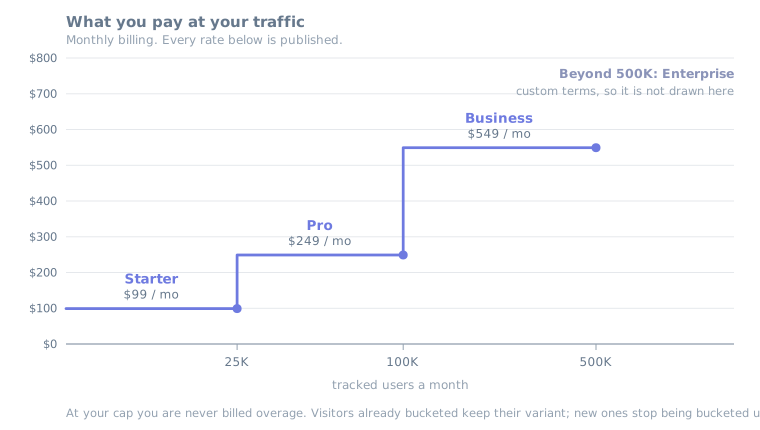
The ladder underneath is four published tiers. Starter is $99 a month for 50,000 tracked users, 5 experiments and 2 seats. Pro is $249 a month for 200,000 tracked users, unlimited experiments and 3 seats. Business is $549 a month for 500,000 tracked users and 10 seats. Enterprise is custom. Annual billing takes 20 percent off every tier, so Pro is $199 a month billed annually, $2,388 for the year. Go past your limit and nothing is billed: visitors already bucketed keep their variants, new visitors stop being bucketed, and you get an email at 80 percent and again at 100 percent.
The bill, side by side
| 100,000 a month | Convert Growth | ABTestly Pro | Gap |
|---|---|---|---|
| Billed monthly | $399 / mo, $4,788 / yr | $249 / mo, $2,988 / yr | $1,800 a year less |
| Billed annually | $3,588 / yr, $299 / mo equivalent | $2,388 / yr, $199 / mo equivalent | $1,200 a year less, about a third |
| Going over | Experiences pause by default when the quota runs out. Charging past it is opt in, at $399 per extra 100,000 on Growth and $699 per 250,000 on Pro. They warn at 90 and 100 percent and never upgrade you without asking | Never billed. Bucketing stops, an email arrives | Two philosophies, both defensible |
If what you actually need is Convert Pro, because five concurrent experiences per project is the thing squeezing you, compare against that tier instead: $5,040 a year billed annually against ABTestly Pro at $2,388, since unlimited experiments start at Pro here. The tier by tier breakdown, including the volume steps above 100,000, is on the Convert pricing page.
Convert list prices exclude VAT. ABTestly prices are billed via Paddle as merchant of record. Applicable tax is handled at checkout.
Convert vs ABTestly, feature by feature
This comparison used to be a page of its own. It lives here now, so the price, the differences and the move read as one thing rather than three.
One correction before the table, aimed at every comparison article still repeating it. If you have read that Convert is a testing tool with no heatmaps and no session recordings, that is out of date. Convert's features page lists native heatmaps included on all plans, and session recordings. Checked 6 September 2026. Anyone comparing on that basis is comparing against a product Convert no longer ships.
| Convert | ABTestly | |
|---|---|---|
| Entry paid tier | Growth: $399 / mo billed monthly, or $3,588 / yr billed annually, for 100,000 tested users | Pro: $249 / mo billed monthly, or $2,388 / yr billed annually, for 200,000 tracked users. Starter is $99 / mo for 50,000 |
| Tier above it | Pro: $599 / mo billed monthly, or $5,040 / yr billed annually | Business: $549 / mo billed monthly, or $5,268 / yr billed annually, for 500,000 tracked users and 10 seats |
| Enterprise | Price on request, annual only | Custom |
| Concurrent experiments | Growth: 5 per project across 5 projects. Pro: unlimited per project across 30 projects | 5 on Starter, unlimited from Pro up, with no project sub division to work around |
| Authoring | Visual editor first, with a code editor beside it | Monaco only. Experiment configuration is JSON, every variation is JavaScript and CSS you wrote |
| Test types | A/B, split URL, multipage, multivariate on Pro, full stack and feature flags on Pro | A/B with multiple variants, and split URL. Nothing else |
| Statistics | Frequentist t tests with a configurable confidence level and one or two tails, and Bayesian with credible intervals, both on every plan. Anytime valid sequential testing on Pro and Enterprise, using Asymptotic Confidence Sequences after Waudby Smith and colleagues. Bonferroni or Sidak correction across variants, and their own documentation recommends Sidak | Three engines: a frequentist z test at 95 or 99, an anytime valid sequential engine, and a Bayesian engine. Frequentist on every plan, the other two from Pro. Each judges conversion and revenue, with an optional Bonferroni or Sidak correction across variants |
| Split integrity | A chi square goodness of fit test that triggers at 99 percent confidence, on every plan. Switched on per project | Chi square check on every plan, flagged on the results panel |
| Revenue | Revenue goes through the tracking queue, with pushRevenue and sendRevenue actions in the legacy script | Per order deduplication with refund netting, mixed currency detection that marks revenue non comparable rather than adding it up, and a report time outlier cap |
| Heatmaps and recordings | Native heatmaps on every plan, plus session recordings under the Convert Signals brand | Experiment heatmaps on Pro and Business, extended to Starter through the ABTestly Signals add on. No session recordings |
| AI assistance | Convert Signals surfaces behavioral friction such as rage clicks and hesitation, and points you at the sessions where it happened | ABTestly Signals reads a page, drafts test hypotheses with the evidence attached, and links each one to experiment creation. An optional add on, free while it is in Beta, on any paid plan |
| Delivery | CDN delivered snippet. No size published on their pricing page | Configuration served from Cloudflare's edge in 300 cities with no origin round trip. Bucketing and variation application run in the visitor's browser. About 31 KB gzipped runtime behind a loader under 1.5 KB, anti flicker off by default |
| Single page apps | Their SDK documentation says a route change needs its own runExperience call. The legacy tracking script buckets on page load | The runtime hooks pushState, replaceState, popstate and hashchange, then re evaluates targeting against the new URL, with no polling loop |
| Analytics | A one tag integration catalog | One data layer exposure event carrying the experiment and the variant, for your existing GA4 or GTM setup to forward |
| Trying it | A 15 day free trial on every tier, and their pricing page does not ask for payment details to start one | A 14 day free trial on monthly plans. A card is required at signup, and nothing is charged until day 15 |
| Access control | Phone support and SSO from Pro up, per their pricing page | Email support, priority email from Pro. Team roles, access presets and change history from Starter, custom permissions from Pro. No SSO today |
| Leaving | Monthly plans cancel with no contract to wait out. Annual simply does not renew | A 30 day money back guarantee on your first paid month, data preserved on downgrade, and a 30 day restore window after cancellation |
Where Convert genuinely wins
- The visual editor, and the people who use it. If a marketer or a page owner builds and QAs variants without a developer in the loop, that is the entire argument and we have no answer to it. ABTestly has no WYSIWYG editing.
- Looking before you pay. Convert's 15 day trial runs on every tier and starts without payment details. Ours takes a card at signup. That is a real difference in how much friction stands between you and a first test.
- Breadth of test types. Multivariate, multipage, full stack experimentation and feature flags on Pro. We do A/B and split URL, and that is the whole list.
- Goals and audiences we do not have. Goals that combine several events with AND and OR, goals bound to your data layer, and analytics goal imports are all missing on our side, and a custom event goal here needs an explicit tracking call. Convert documents advanced goals that join conditions with AND and OR, goals fired from a data layer event and goal imports from Google Analytics, alongside a library of prebuilt audience templates. Check yours against those rather than assuming the rebuild is one for one. Checked 6 September 2026.
- Session recordings. Convert Signals records sessions and surfaces the friction in them. ABTestly has heatmaps and no recordings, so if watching a session is part of how your team finds problems, that habit does not come with you.
- A decade of operating history. Certified agency partners, phone support, SSO, and a record of honoring legacy pricing. We are newer, and newness is a real risk to price into the decision.
- Still independent. Convert describes itself as a profitable, bootstrapped business, and we found nothing in 2026 to suggest that changed, in a year when VWO and AB Tasty combined under a single private equity owner. If you have watched a vendor get bought out from under you before, that is worth pricing in too.
Where ABTestly is the better fit
- The price at the same volume. $1,200 a year less on annual billing, $1,800 a year less on monthly, at 100,000 tested users.
- Every variation is code you can read. The JavaScript and CSS are explicit, reviewable, and yours to copy into your own repository. Targeting, goals and allocation stay in the ABTestly dashboard; there is no repository sync today, and we are not going to imply one.
- Three statistics engines, no add on. Frequentist on every plan, sequential and Bayesian from Pro, each applied to conversion and to revenue, with the method written out in our docs rather than summarised in a support article.
- Exact counting behind every verdict. Results are computed from an exact experiment ledger, so the counts a decision rests on are the real ones.
- Revenue handled carefully. Per order deduplication with refund netting, mixed currency detection, and a report time outlier cap, so one enormous order cannot decide a test on its own.
- Speed guardrails. Per variant, per device p75 LCP, with a warning when a variant is meaningfully worse than the baseline. Pro and up.
- Mutual Exclusion Groups with holdout cells. Experiments in a group never share a visitor, and a holdout keeps a slice of traffic out of all of them. Business and up. Changing the group's membership reshuffles assignment, so the holdout is a control within one generation of the group, not a persistent program level holdout.
- No automatic overage charges, ever. There is no invoice that can surprise you at the end of a good month.
So which one
Stay on Convert if marketers build your variants, if multivariate or full stack testing is on the roadmap, if session recordings are part of how your team finds problems, or if SSO and phone support are procurement requirements today.
Move to ABTestly if the people writing your variants already write code, if your reporting goes to GA4, if you have hit the five experiences per project ceiling, and if the annual difference is worth an afternoon of rebuilding. Genuinely unsure? Rebuild one experiment and judge the workflow instead of the table.
What migrating from Convert actually involves
This guide used to be a page of its own as well. Most Convert accounts move in an afternoon, and the honest reason is that most accounts run fewer live experiences than they remember. Nothing imports automatically, and we will not claim it does. What follows is the map.
What carries, and what does not
| What you have in Convert | What happens to it |
|---|---|
| Custom JavaScript you already wrote | Ports fairly directly. It is code already, so most of it drops into an ABTestly variation with small edits |
| Variations built in the Visual Editor | Do not transfer, and this is the main cost of the move. Convert's own documentation is the clearest statement of why: DOM mutations defined in the UI are not delivered to their Fullstack SDK callers. Read that twice if part of your stack already consumes Convert through the SDK, because those variations were never reaching it either. Here they are re authored as explicit code |
| Legacy queue calls on _conv_q | The triggerConversion, pushRevenue and sendRevenue actions become one goal tracking call. Convert's modern SDK already made the same jump, and their docs put it plainly: call SDK methods directly, there is no queue |
| Goals | Recreated from the goal library. Compounded goals that combine events have to be split or dropped, and a goal you had bound to your data layer needs an explicit tracking call instead |
| locationProperties: url, path, referrer, hostname, hash, query | URL rules over the path, the full URL with query, the query string and the hostname, with referrer moving to the audience side |
| visitorProperties: country, device, browser, os, visitorType, utm_source | Audience conditions, close to one for one, with region and city available as well as country |
| Case sensitivity | The gotcha nobody expects. Convert's URL matching is generally case insensitive. Here it is a per rule toggle that new URL rules switch on by default, so confirm it on every rule you rebuild rather than assuming it |
| The _conv_v visitor cookie, with its 6 month life | Does not carry, and cannot. A new tool means a new identity, so anyone halfway through an experience starts again. Finish or stop live tests rather than trying to hand them over mid flight |
| Historical results | Stay in Convert. Export what you need for your records before you cancel. Neither tool can re run the other's past traffic |
| Single page app handling | Convert's SDK asks for a runExperience call after a route change. Our runtime hooks the history API and re evaluates on the new URL. Either way, walk your routes in preview before launch |
The move, step by step
1. Inventory what you actually use, 30 minutes. List the active experiences in each project, the goals attached to them, the audiences, and the site areas. Most accounts find a handful of live tests and a large graveyard of drafts. You are migrating less than you think.
2. Create the site and install the snippet, 15 minutes. Sign up, add your site, declare the hosts it runs on, and paste the snippet into your head. Anti flicker hiding is one checkbox and it is off by default, so switch it on only if you need pre paint delivery.
3. Rebuild one experience as a pilot, 30 to 60 minutes. Pick the simplest live concept you have. Set variants, weights, targeting and goals in the dashboard, author each variation in Monaco, then use the preview links to QA every variant on your live site before anything launches.
4. Validate the tracking before you move traffic. This is the step that takes the risk out, and it is not a race between two live tests. Point both tools at the same change and some visitors land in both, some in neither, and two scripts argue over the same elements, so the conversion figures stop meaning anything. The isolation has to sit upstream of both platforms: ABTestly's exclusion groups coordinate experiments inside ABTestly and have no say in what Convert buckets, so no audience you build here can keep a visitor out of the other tool. Split traffic once, outside both, on a deterministic rule over a stable visitor id, expose the result to each tool as an audience, and confirm the split in both dashboards before either side serves a treatment.
A no change ABTestly experiment is the lighter option and it does validate ingestion. Be clear about what it still costs. A visitor counts as a tracked user the first time they are bucketed, whether or not the variation changes a pixel, and the run writes real assignment and goal records. It is a plumbing check, not a free dry run. Either way, confirm four things: that the visitors you expect to qualify do qualify under the same URL and audience rules, that exposure fires only after consent the way your CMP is wired, that exposure is recorded once per visitor with no sample ratio warning on the results panel, and that each goal fires on the same action you defined in Convert.
Then launch one real low risk test. Two tools will not agree to the decimal, and that is not a fault in either of them, because identity, attribution, consent handling and goal definitions all differ for legitimate reasons. Treat the whole exercise as a plumbing check. If something looks wrong, send us both setups and we will find out why before you have committed to anything.
5. Move the rest and cancel, one to two hours plus rebuild time. Rebuild the remaining experiences, export your Convert history, then cancel. On a monthly Convert plan there is no contract to wait out. On annual, the plan simply does not renew, so starting a few weeks before renewal costs you nothing in overlap.
Honest effort estimate
| Your Convert account | Expect to spend |
|---|---|
| One to three live experiences, already mostly custom code | Half a day, plus the validation step |
| Five to ten experiences with custom goals and audiences | One to two days, plus the validation step |
| Heavy visual editor use, compounded goals, complex segments | Two to four days. Time is the smaller problem, though. The bigger one is whether a code first tool suits the people who currently build your tests. If it does not, stay on Convert. We would rather tell you that now than after the rebuild |
We will do it with you
Migration help is free and human. Send a redacted inventory of your Convert account to [email protected]: experiences, goals, audiences, site areas, and anything you need exported before you cancel. Strip the URLs and the numbers if you like, the structure is what we read. You get back three lists: what moves as it is, what has to be rebuilt, and what ABTestly cannot replace at all. If you would rather start smaller, send us one experiment and we will recreate that one with you first.
Quick answers
How much does Convert cost, and how does ABTestly compare?
Convert Growth is $399 a month billed monthly, or $3,588 for the year billed annually, for 100,000 monthly tested users. Convert Pro is $599 a month billed monthly, or $5,040 for the year billed annually. ABTestly Pro covers the same 100,000 tracked users for $249 a month billed monthly, or $2,388 for the year billed annually, and it includes up to 200,000. That is $1,800 a year less on monthly billing and $1,200 a year less on annual. Convert figures verified on convert.com/pricing on 6 September 2026.
Does Convert have heatmaps and session recordings?
Yes. Convert's features page lists native heatmaps included on all plans, and session recordings under the Convert Signals brand. Checked 6 September 2026. Comparison articles claiming Convert is testing only are out of date. ABTestly has experiment heatmaps on Pro and Business, extended to Starter through the ABTestly Signals add on, and no session recordings at all.
Convert Signals and ABTestly Signals share a name. Are they related?
No. They are unrelated products from different companies that happen to share a word. Convert Signals is Convert's session recording and behavioral analysis feature. ABTestly Signals is our optional add on that reads a page and drafts test hypotheses with the evidence attached. In this comparison we always write the company name in front, because on a Convert page the word on its own would be ambiguous.
Do my Convert visual editor variations transfer?
No, and Convert's own documentation explains why better than we can: Visual Editor changes, meaning DOM mutations defined in the UI, are not delivered to Fullstack SDK callers. Those variations are editor state rather than portable code, so they get re authored as JavaScript and CSS here. Custom JavaScript you already wrote in Convert ports fairly directly. This is the main cost of the move, and the reason we ask heavy visual editor users to think hard before starting.
What breaks in targeting when I rebuild?
Two things catch people. First, case sensitivity: Convert's URL matching is generally case insensitive, while ABTestly puts an ignore case toggle on each rule, switched on by default for new URL rules, so check every rule you rebuild. Second, the visitor cookie. Convert's _conv_v cookie lasts six months and does not carry across, so anyone mid experience starts fresh. Finish or stop live tests rather than handing them over mid flight.
Can I try ABTestly before I cancel Convert?
Yes. Start a 14 day free trial on a monthly plan. A card is required at signup and nothing is charged until day 15. Validate the tracking first rather than running the same live test in both tools, since two tools serving one visitor make both sets of figures unreadable. Convert's own 15 day trial runs on every tier and starts without payment details, which is a fair advantage on their side.
Sources checked
Checked on 6 September 2026. Prices and product behaviour change, so verify before you rely on a number.
- Convert pricing, plan caps and trial terms: convert.com/pricing. Plan caps come from the comparison table, not the pricing FAQ, which still describes a retired plan and contradicts the table
- Convert integrations count: convert.com/integrations
- Convert object model, heatmaps and session recordings: convert.com/features
- Convert tracking script, SDK, visitor cookie and targeting properties: docs.developers.convert.com
- Convert statistical methods, article dated August 2026: support.convert.com, statistical methods used
- Convert SRM check: support.convert.com, what is SRM
- Convert quota and over quota charges: support.convert.com, prevent extra charges
- Convert collaborators and access levels: support.convert.com, collaborators
- ABTestly pricing: abtestly.com/pricing
- ABTestly statistics methods: docs.abtestly.com/results/engines
- ABTestly exact experiment ledger: docs.abtestly.com/results/exact-ledger
- ABTestly speed guardrail: docs.abtestly.com/results/speed-guardrail
Convert pricing, plan details and product scope verified on convert.com on 6 September 2026. Check their site for current figures. ABTestly is not affiliated with Convert Insights, Inc.
Related reading: what Convert costs · Convert, VWO and Optimizely side by side