Migrate from Optimizely. Step by step.
ABTestly pricing and runtime verified 6 September 2026. Optimizely does not publish pricing; the figures below are third party estimates, marked as such, and were checked on 6 September 2026. Check optimizely.com for current details.
Yes, this is written by the ABTestly team, so read it knowing who wrote it. We are not going to pretend an Optimizely to ABTestly move is an import. Optimizely is a broad enterprise platform and ABTestly is code first, client side A/B testing, so your web experiments get rebuilt rather than migrated, and the parts of Optimizely that are not web A/B tests do not move at all. What we can promise is an honest map of what carries over, a pilot you can run on the 14 day trial, and a tracking validation step that lets data decide before you cancel anything.
What carries over, and what does not
There is no Optimizely export that ABTestly ingests, and we will not claim one. The honest picture is that your thinking carries over cleanly and your artifacts get rebuilt. Here is each piece.
| What you have in Optimizely | Moving to ABTestly |
|---|---|
| Experiment concepts and hypotheses | Rebuilt as JSON experiment configs. The hypothesis, variants, and split all carry; you recreate the definition once |
| Variants built in the Optimizely visual editor | Do not transfer. They are re expressed as real JS and CSS in the Monaco editor. This is the main cost of the move |
| Custom JavaScript you already wrote in Optimizely | Ports fairly directly. It is code already, so most of it drops into an ABTestly variation with small edits |
| Full stack and server side experiments, feature flags | No equivalent. ABTestly is client side A/B testing, so keep Optimizely or a dedicated feature flag tool for these |
| Goals and metrics | Recreated as ABTestly goals. Two system goals attach to every new experiment automatically, and you add your custom ones |
| Targeting and audiences | Re expressed as URL and audience rules. URL targeting can be set case insensitive per rule |
| Historical results and Stats Engine reports | Stay in Optimizely. Export them for your records before you cancel. They do not import, and neither tool can re run the other's past traffic |
| Integrations and program management | Rewired, not migrated. ABTestly writes an exposure event to your data layer for GA4 or GTM to forward; anything else is set up fresh |
The migration, step by step
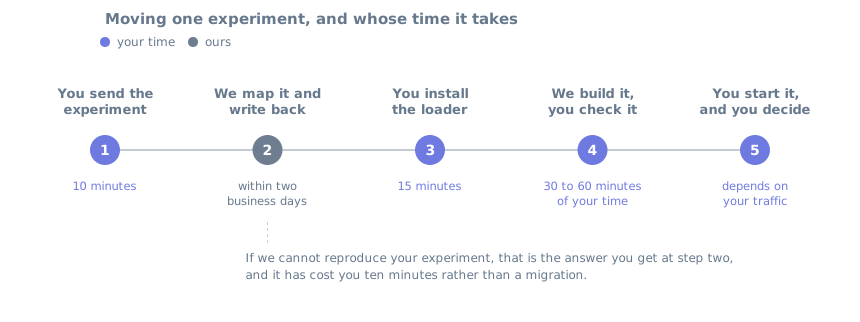
1. Inventory what you actually use (30 min). List your active Optimizely experiments, goals, and targeting rules. Sort them into client side web A/B tests, which are what move here, and everything else: full stack experiments, feature flags, and server side rollouts, which do not. Note which web variants were built in the visual editor and which already use custom code, because that split predicts your effort more than the test count does.
2. Create your ABTestly site and install the snippet (15 min). Sign up, add your site, and paste the snippet into your <head>. Config is served and beacons are received at Cloudflare's edge, and the variant buckets and applies in the visitor's browser. The loader is a few lines and pulls the full runtime, about 31 KB gzipped, measured on our own snippet. Anti flicker hiding is available but off by default, so turn it on only if you need it. The install guide has the exact snippet your site generates.
1<!-- ABTestly · paste first in <head> -->
2<script>(function (w, d) {
3  var s = d.createElement('script');
4  s.src = 'https://cdn.abtestly.com/s/YOUR_KEY.js';
5  s.async = false;
6  (d.head || d.documentElement).appendChild(s);
7})(window, document);</script>
3. Rebuild one experiment as a pilot (30 to 60 min). Pick your simplest live web concept. You set the variants, split, targeting, and goals in the dashboard, then author each variation in Monaco. This is where an Optimizely visual edit becomes real code. A headline swap that was a click and type in the editor is a line of JavaScript here, which is more explicit and can be copied into your own repository, but is not free to redo. Targeting, goals, allocation, and method settings stay in the ABTestly dashboard; there is no repository sync today. The config below is illustrative; the exact flow is in the build docs.
// The dashboard builds this. Each variation is code you write.
{
  "key": "hero003",
  "variants": [
    { "name": "control",          "weight": 5000 },  // basis points, 5000 = 50%
    { "name": "shorter-headline", "weight": 5000 }
  ],
  "goals": [ { "key": "signup_click", "isPrimary": true } ]
}
// the change you made in Optimizely's editor, written as code
const h = document.querySelector('.hero h1');
if (h) h.textContent = 'Ship experiments in code';
Attach your goals, set targeting, and use the preview links to QA each variant on your live site before you launch. The snippets above are illustrative; the docs cover the exact config shape and the goal library.
4. Validate your tracking before you move traffic (passive). This is the step that de risks the switch, and it is not a race between two live tests. Run the same change in both tools at once and some visitors land in both, some in neither, and two scripts fight over the same elements, so the conversion numbers stop meaning anything. Prove the instrumentation first, without letting two tools touch the same visitor. The isolation has to live upstream of both tools: ABTestly's exclusion groups coordinate experiments inside ABTestly, and they have no say in what Optimizely buckets, so no audience you build here can keep a visitor out of the other tool. Split the traffic once, outside both platforms, with a deterministic rule on a stable visitor id. Expose the result to each tool as an audience or activation condition, configure each one to serve only its own group, and verify the split in both dashboards before either side runs a treatment.
A no change ABTestly experiment is the lighter option, and it does validate ingestion. A 14 day free trial lets you run that validation at your real traffic volume without being charged. A card is required at signup, and nothing is charged until day 15. Be clear about what it still costs: a visitor counts as a tracked user the first time they are bucketed, whether or not the variation changes anything, and the run writes real assignment and goal records. It is a plumbing check, not a free dry run, and not a like for like outcome comparison against Optimizely. Either way, confirm the plumbing:
- Eligibility. The visitors you expect to qualify actually qualify, under the same URL and audience rules.
- Consent. Exposure fires only after consent, the way your CMP is wired.
- Exposure. ABTestly records an exposure when you expect one, deduped per visitor, with no sample ratio mismatch warning. The SRM guard runs on every plan.
- Goals. Each goal fires on the same action you defined in Optimizely.
Once the tracking checks out, launch one real low risk test in ABTestly. Hold the primary metric, the population, and the attribution rules the same across both tools, and stop there: matching the engine names does not make the methods comparable. Optimizely's Stats Engine pairs sequential testing with false discovery rate control across metrics and variations. ABTestly's sequential engine (Pro and up) is a beta binomial mixture confidence sequence, with an optional Bonferroni style correction across variants. Both are anytime valid; they are not the same procedure, so do not expect the thresholds or the verdicts to agree. Do not expect the conversion rates to line up to the decimal either, since identity, attribution, consent, and goal definitions differ. If something looks off, send us both setups and we will find out why before you have committed to anything.
5. Move the rest and cancel (1 to 2 hours plus rebuild time). Rebuild your remaining web experiments, export your Optimizely history for your records, then wind the contract down. Mind the timing, and start earlier than feels necessary. Optimizely subscriptions renew for twelve months on their own, and stopping that renewal takes ninety days written notice before the term ends, per clause 3.1 of the published subscription agreement. A few weeks before renewal is already too late. Work backwards from your renewal date, give notice first, and validate inside the notice period rather than after it: orders are non cancellable and fees non refundable, so that window is the only lever you have. Then keep Optimizely for any feature flag or full stack work ABTestly does not cover, which is a real reason to keep a smaller contract rather than none.
Honest effort estimate
| Setup | Expected effort |
|---|---|
| 1 to 3 simple web tests, mostly custom code already | Half a day plus the validation week |
| 5 to 10 web tests with custom goals and audiences | 1 to 2 days plus the validation week |
| Heavy visual editor use, or reliance on full stack, feature flags, or personalization | 2 to 4 days or more for the web tests, and the full stack surface does not move at all. Decide honestly whether code first, client side testing covers your program before you start (the vs page covers this) |
What you get back is a price you can read. ABTestly Pro is $249 / mo, or $199 / mo billed annually, for 200,000 tracked users, with no automatic overage and a 30 day money back guarantee on your first paid month. Before anything else, check your renewal date. Optimizely subscriptions renew for twelve months on their own, and stopping that takes ninety days written notice before the term ends, so the window to give notice can close months before you would actually move. Optimizely is quote only, so there is no list price to compare against; Vendr's marketplace data (not Optimizely's official figures) puts Intelligence Cloud, the line that covers experimentation and personalization, at roughly $50,000 to $80,000 a year at mid market and $200,000 or more at enterprise scale, checked 6 September 2026. The honest trade is fewer enterprise features for published, flat pricing and transparent statistics: three statistics engines (Frequentist on every plan; Sequential and Bayesian on Pro), applied to conversion and revenue, with a sample ratio mismatch guard on every plan. Published tiers, all on one page: Starter $99 / mo (50,000 MTU), Pro $249 / mo (200,000 MTU), Business $549 / mo (500,000 MTU), and Enterprise custom pricing, with annual billing 20% off. Full pricing on the pricing page. Not sure yet whether to switch at all? Start with the Optimizely alternative page, or read the full Optimizely vs ABTestly comparison.
Optimizely publishes no list price for Web Experimentation. The dollar ranges above are third party market estimates, not official figures; if Optimizely publishes a price after this page is verified, check it against optimizely.com/pricing. ABTestly prices are billed via Paddle as merchant of record; applicable tax is handled at checkout.
Where Optimizely genuinely wins
Honesty matters more to us than the sale, so here is where staying on Optimizely, or keeping it alongside ABTestly, is the right call.
- Enterprise experimentation scale. Full stack, server side, feature flags, multi arm, and program management tooling built for teams running hundreds of experiments across products. ABTestly is client side A/B testing.
- A peer reviewed Stats Engine. Optimizely publishes its sequential testing methodology, in production for years. If that specific engine matters to you, they own it.
- Feature flags and rollouts. A first class product surface, not just an experiment side effect. ABTestly has no feature flags and no server side SDK.
- A visual editor for non technical people. A page owner can build and QA a variant without a developer. ABTestly has no visual editor, so if marketers build your variants, that is a real reason to stay.
- Enterprise vendor and compliance. Established brand, procurement paperwork ready, dedicated CSMs, SLAs, and formal certifications such as SOC 2 Type 2 and ISO 27001. ABTestly writes an exposure event to your data layer for GA4 or GTM to forward, and does not yet publish those certifications.
If none of those are blockers, published pricing and transparent statistics are worth the rebuild.
We will do it with you
Migration help is free and human. This is a white glove offer, not a form. Send a redacted inventory of your Optimizely account to [email protected]: experiments, goals, audiences, integrations, and anything you need exported before you cancel. Strip the URLs and the numbers if you want, the structure is what we read. We will map every web experiment, goal, and targeting rule to its ABTestly equivalent, flag the variants that need rewriting from the visual editor, and we will send back three lists: what moves as is, what has to be rebuilt, and what ABTestly cannot replace. Feature flags and full stack are in that third list. You get a realistic effort estimate with it, before you commit to anything. If you would rather start smaller, send us one experiment and we recreate that one in ABTestly with you before you plan anything bigger.
Start the pilot: app.abtestly.com/sign-up. Whether one pilot test is enough to read a result depends on your conversion rate and the size of the effect you are looking for.
Common questions
What actually moves from Optimizely to ABTestly?
Your live client side web A/B tests get rebuilt: variants, goals, and targeting. Custom JavaScript you already wrote ports fairly directly, and visual editor changes are re authored as code. Full stack experiments, server side rollouts, and feature flags do not move at all; keep Optimizely or a dedicated tool for those.
Is there an automatic Optimizely importer?
No, and we will not claim one. Nothing auto imports from Optimizely. Send your experiment list to [email protected] and we map each web experiment, goal, and targeting rule to its ABTestly equivalent, and tell you plainly what does not move.
How do I confirm ABTestly is tracking correctly before I switch?
Validate tracking before you move traffic. Split traffic outside both tools first, with one deterministic rule that sends each visitor to exactly one vendor, then configure each tool to accept only its assigned group and verify the split in both. ABTestly's exclusion groups coordinate experiments inside ABTestly, so no ABTestly setting can decide what Optimizely buckets. A no change ABTestly experiment is the lighter option and it does validate ingestion. A 14 day free trial covers that validation at no charge, though a card is required at signup. A bucketed visitor still counts as a tracked user and the run still writes real assignment and goal records, so it is not a like for like comparison. Either way, confirm eligibility, consent, exposure, and goals. Then launch one real low risk test. Hold the primary metric, the population, and the attribution rules the same, but do not expect the thresholds or the verdicts to agree: Optimizely combines sequential testing with false discovery rate control across metrics and variations, and ABTestly's sequential engine is a different anytime valid method. Do not run the same live test in both tools at once.
How does pricing compare?
Pro is $249 / mo, or $199 / mo billed annually, for 200,000 monthly tracked users, published on the pricing page. Optimizely is quote only, so compare your own Optimizely quote and the scope you need against ABTestly's published plan. For a deeper look, see the full Optimizely pricing breakdown.
Sources checked
Checked on 6 September 2026. Both products document their statistics and sample ratio monitoring; the links below are the primary sources, not our summary of them.
- ABTestly pricing: abtestly.com/pricing
- Install snippet and size: docs.abtestly.com/install/snippet
- Statistics engines: docs.abtestly.com/results/engines
- Sample ratio guard: docs.abtestly.com/results/srm
- GA4 data layer: docs.abtestly.com/integrations/ga4-datalayer
- Refund terms: docs.abtestly.com/billing/refunds
- Optimizely statistical methods: support.optimizely.com, statistical analysis methods
- Optimizely false discovery rate control: support.optimizely.com, false discovery rate control
- Optimizely plans and packaging: optimizely.com/plans
- Optimizely subscription agreement, published 10 November 2025: optimizely.com/legal/terms
- Contract estimates, 126 purchases from 65 unique buyers, analysis updated February 2026: vendr.com/marketplace/optimizely
- Optimizely automatic SRM detection: support.optimizely.com, automatic SRM detection
ABTestly pricing and runtime verified 6 September 2026. Optimizely does not publish pricing; third party estimates cited and checked on 6 September 2026. ABTestly is not affiliated with Optimizely.